
Knowledge sharing and tips
All ICE Exchange user IDs will soon be migrated to an ICE Global ID login. The Global ID is the email address registered to your/an existing ICE user ID.
Example:
User ID: jdoe
Global ID: [email protected]
Why we are making the change
Single login, multiple apps
A Global ID gives users one login to access all their ICE applications and user IDs, reducing the need to manage multiple credentials.
Improved security
Centralising authentication around a verified email address strengthens account security and simplifies access management.
Easier administration
Global IDs make it simpler for admins to manage user access, onboard new users, and link ICE applications under a single identity.
What to expect
Once your account conversion begins, you will be able to log in five more times with your existing ICE user ID before your Global ID is required. Your existing password will carry over automatically. No action is needed unless you experience an issue.
Troubleshooting
- Log out of the Connect Launcher, then log back in using your email address and existing password.
- If your password does not work, select "Forgot/Reset password" on the login page and follow the reset link sent to your inbox.
- If the user ID field is grayed out, go to ice.com, select Login, then Desktop Launcher, and download the launcher again.
Invoice Number Update — Effective July 1, 2026
Starting with the June 2026 service period (invoices dated July 1, 2026 and after), all invoices will display a single consolidated invoice number across all revenue streams.
- Previously, each revenue line on an invoice carried its own invoice number — for example, OTC Commission Adjustment, Market Data Exchange Fees, FIX Order Server License, etc. appeared under a different number. Going forward, all revenue streams billed under ICE US OTC on a given invoice will share one invoice number ending in "999", making it easier to reference and remit payment.
- Invoices for service periods prior to the cutover will retain the old format with individual invoice numbers per revenue stream. Invoices for the June 2026 service period and beyond will reflect a single invoice number across all line items.
- Bilateral Invoices will continue using the prior invoice number logic until consolidation is completed, expected by end of July 2026.
If you have questions about your invoice, please contact us.
ICE also offers a MFT (Managed File Transfer) setup that connects to ICE Access to download all users and user information — providing a more efficient reconciliation process for administrators.
ICE Administrators can view all active users and permissions via ICE Access under the Admin User Report tab. This allows administrators to search across all companies or filter by individual parameters such as email address, name/user ID, market type, user type, and ICE Mobile Access status.
Navigate to service.ice.com and log in
Enter your Global ID (email address) and password when prompted
Select ICE Access from the top-left menu
Select the User Admin Reports tab at the top of the page
As of February 2, ICE Exchange ID deactivations have moved to ICE Access. To log into ICE Access, navigate to service.ice.com → Login → ICE Access → User Admin Reports.
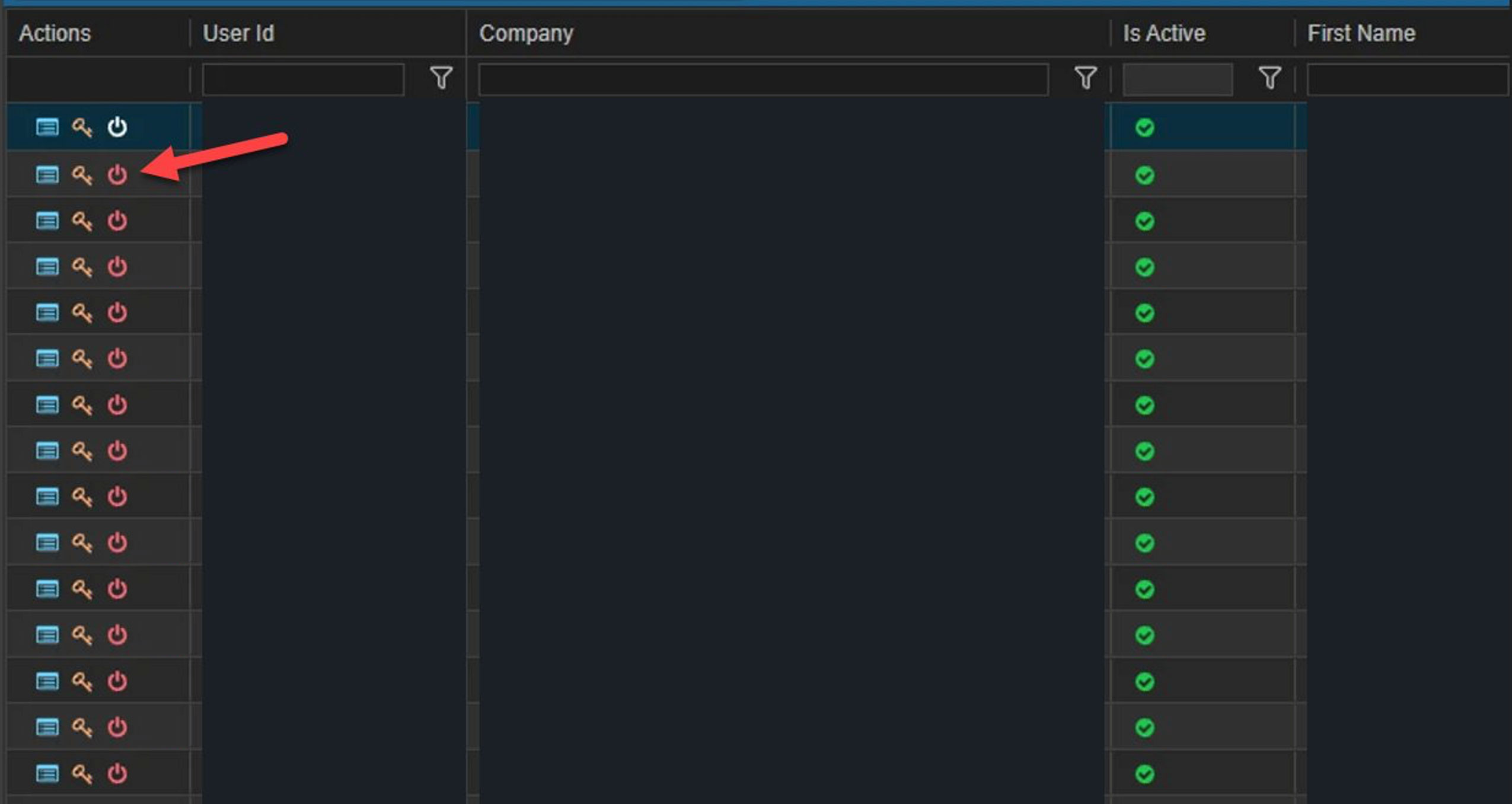
To submit a deactivation request, click the red icon in the Actions column next to the User ID.
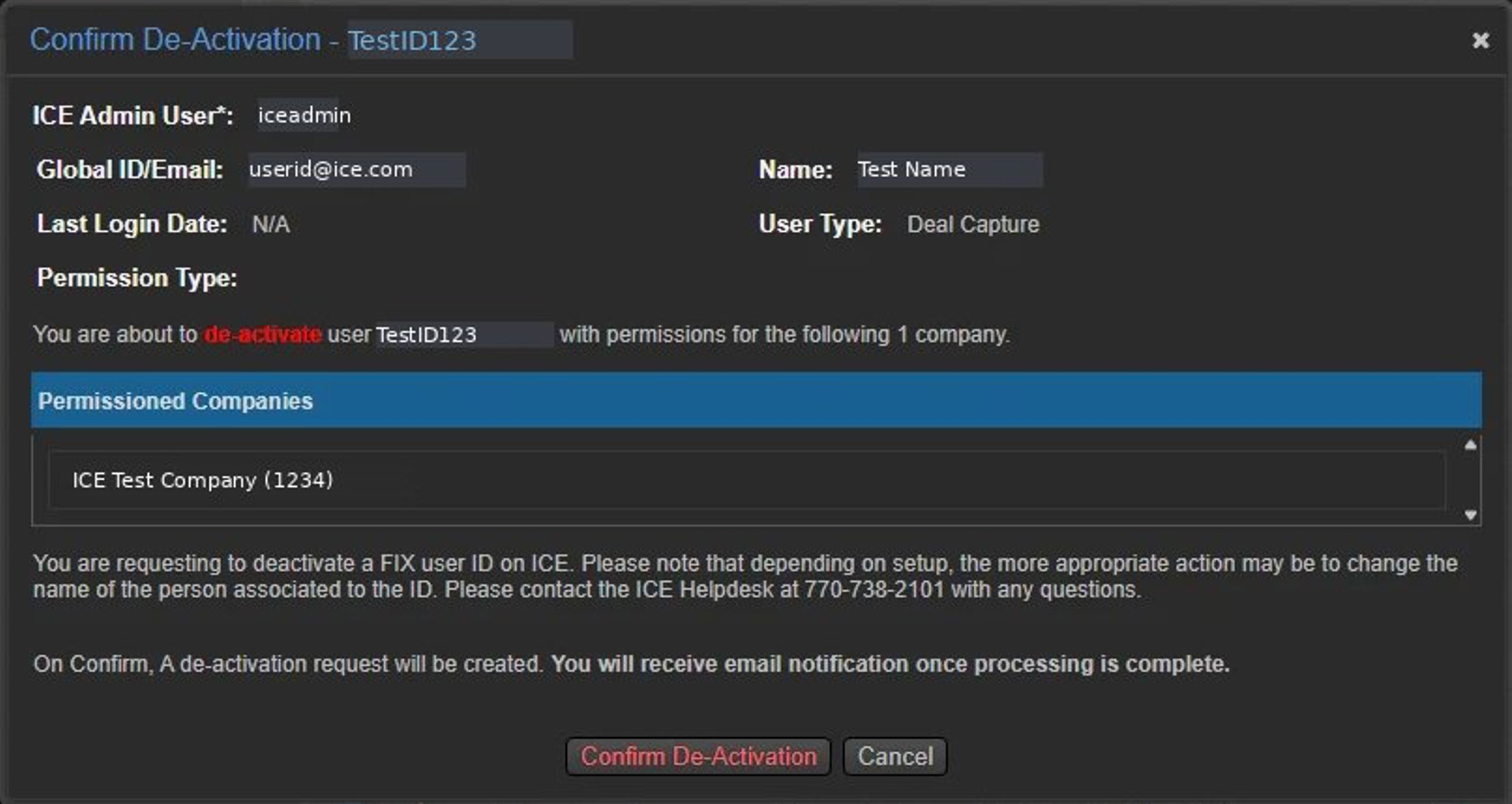
On the next screen, click Confirm De-Activation to proceed. This will come to the ICE Trade Operations team for internal review and processing.
Please note, for some IDs you will not be able to submit deactivation requests via ICE Access. In those scenarios please continue to email [email protected]
Upcoming ICE Futures market news
New markets
Extended Trading Hours for Natural Gas and Power Contracts.
Important dates
Monday, October 12: Columbus Day / Canadian Thanksgiving Day
Access your monthly invoice
Please log in to the Invoice Portal to download your monthly invoices.
If the button doesn’t work, copy and paste this URL into your browser: https://sso.ice.com/#/pageLogin